Pinterest GIF
Downloader

Free Pinterest GIF downloader tool. Save animated GIFs from Pinterest in their original quality. No watermarks, no signup, 100% free.

Free to use. No account, no ads, no daily cap.
πŸ”’
HTTPS
Encrypted
βœ…
No trackers
No ad scripts

Try Our Extensions:

🎞️
Save Animated GIFs

Download the original animated GIF file from Pinterest. The animation stays intact and loops perfectly on any device.

πŸ–ΌοΈ
Original Quality

We never compress or downgrade your GIFs. You get the exact same file the creator uploaded to Pinterest.

⚑
Fast and Free

No registration, no payment, no daily limit. Paste a pin link and the file ends up on your device.

✨
Clean Interface

Simple, clutter-free design. Just paste your link, click one button, and save your GIF.

How to Download Pinterest GIFs?

Saving animated GIFs from Pinterest takes just a few seconds. Copy the GIF pin link, paste it above, and click download. The original animated file saves directly to your device.

1
copy-pinterest-gif-url

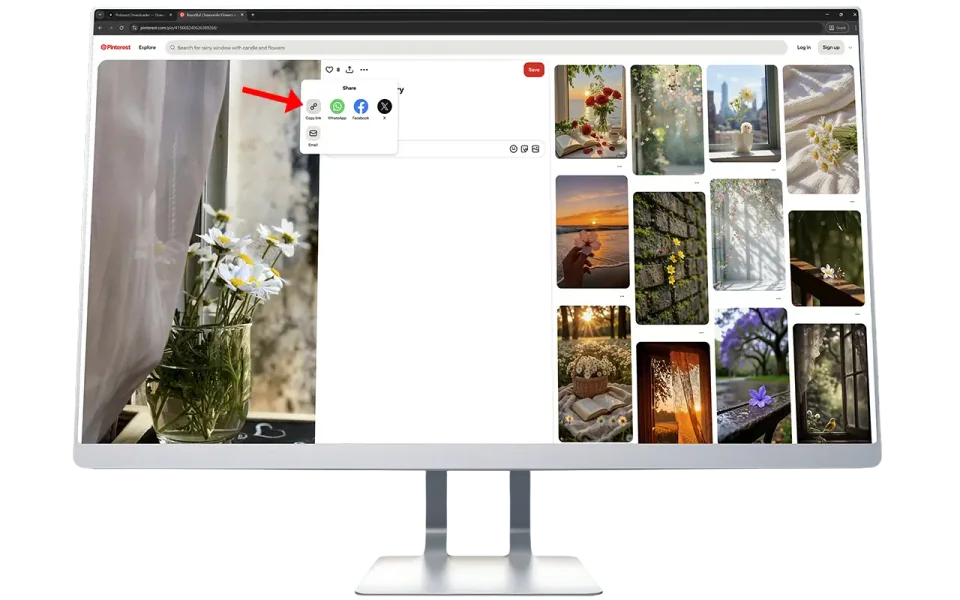
Copy the Pinterest Link

Open the Pinterest app or website. Find the GIF you want and copy its link from the address bar or share menu.

2
paste-the-copied-link

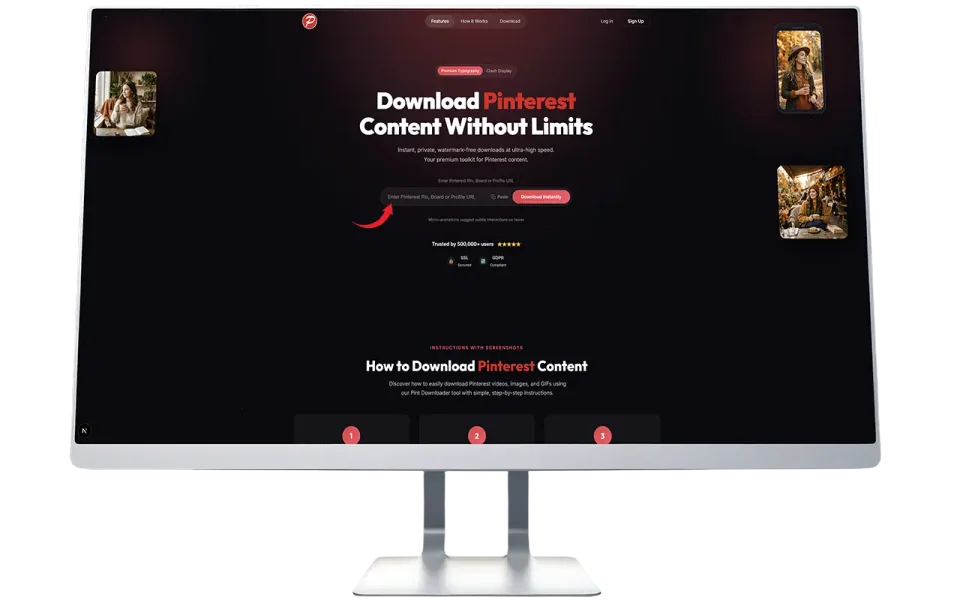
Paste the Link

Come back to this page and paste the copied link in the search box above. Then click the "Fetch Media" button.

3
download-your-gif

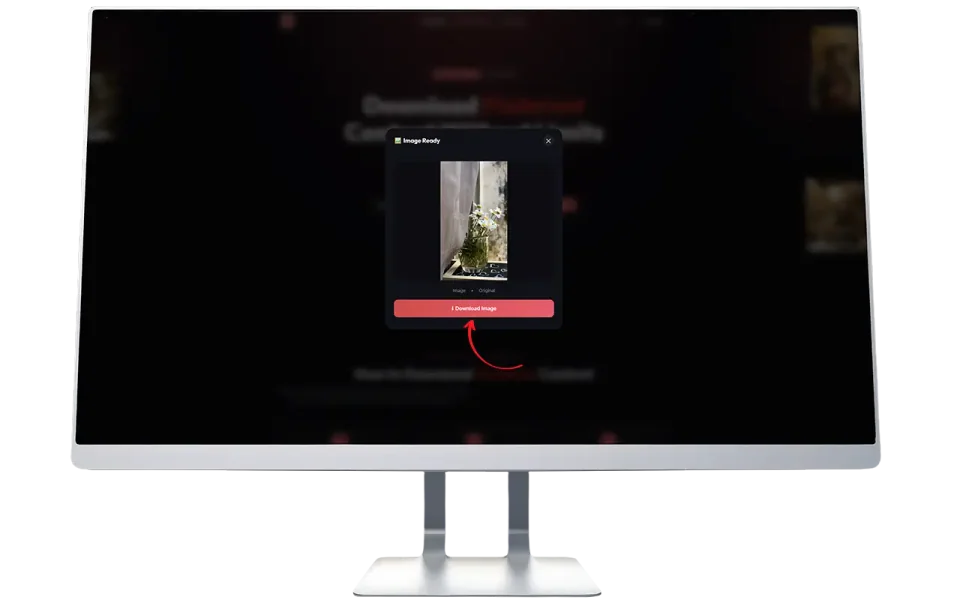
Download the GIF

Once the preview appears, click the Download button to save the animated GIF to your device.

What is Pinterest GIF Downloader?

Pinterest GIF Downloader is a free web tool that lets you save animated GIFs from Pinterest directly to your phone, tablet, or computer. When you find a funny, inspiring, or useful GIF on Pinterest, you usually cannot save it with the animation included. Pinterest's built-in save feature often strips the animation and gives you a still image instead.

That is exactly why we built this tool. You paste the link to any public Pinterest GIF pin, and we fetch the original animated file for you. The GIF you download plays exactly like it does on Pinterest, with full animation, proper looping, and no quality loss.

There is nothing to install. No app downloads, no browser extensions required, no account creation. Just open this page, paste your link, and save your GIF. It works on every device and every browser.

Why People Download Pinterest GIFs

Animated GIFs are everywhere on Pinterest. From reaction GIFs to tutorial animations, people have real reasons for wanting to save them. Here are the most common ones we hear from our users:

πŸ’¬
Messaging and Social Media

People find the perfect reaction GIF on Pinterest and want to share it in WhatsApp, iMessage, Discord, or Telegram. Having the actual GIF file makes sharing much easier than sending a Pinterest link that others have to click on.

🎨
Design Inspiration

Designers and animators browse Pinterest for animation references. They need the actual files to study frame timing, color transitions, and movement patterns. Screenshots do not capture this information.

πŸ“š
Educational Content

Teachers use animated GIFs to explain concepts visually. A GIF showing how a volcano erupts or how blood flows through the heart is far more useful than a static image. Saving these GIFs lets educators use them in presentations and classroom materials.

✍️
Blog Posts and Articles

Content creators and bloggers use GIFs to make their articles more engaging. A well-placed animated GIF breaks up long text and keeps readers interested. Pinterest has a massive collection of useful GIFs for this purpose.

πŸ“‚
Personal Collections

Many people simply want to save funny or interesting GIFs to their personal device. Having them saved offline means they can access and share them anytime, even without internet access.

Most users are not trying to misuse content. They want GIFs for personal use, education, or creative projects. We encourage everyone to respect the original creators and give proper credit when using their work publicly.

How Our Pinterest GIF Downloader Works

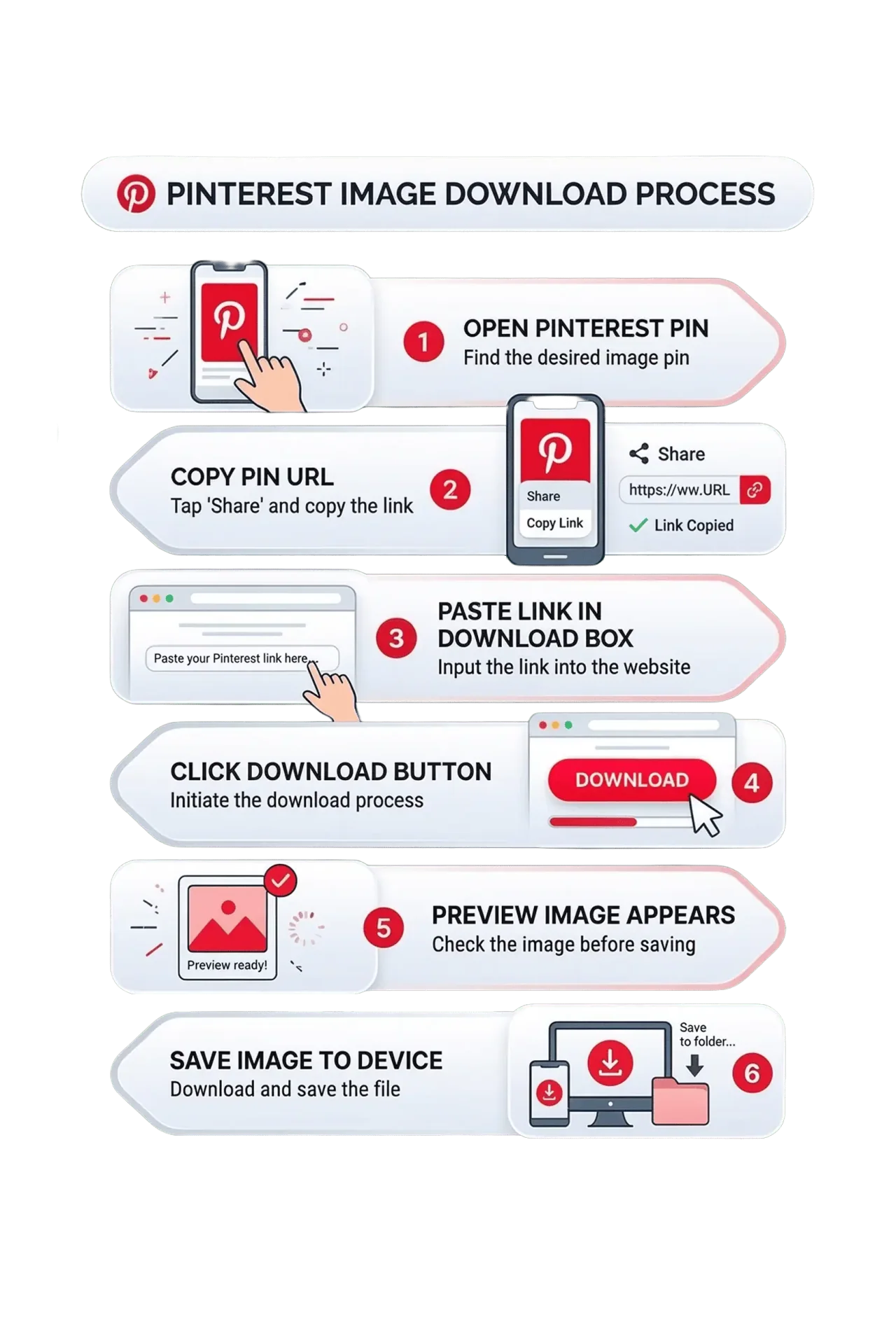
We tested this tool on dozens of devices and hundreds of different GIF pins before launching it. Here is the exact process, step by step:

1

Open Pinterest on your phone or computer and find the GIF you want to save.

2

Copy the pin URL from the browser address bar. It should look something like https://www.pinterest.com/pin/885661082981717612/

3

Come to this page and paste the link into the download box above.

4

Click the "Fetch Media" button and wait a couple of seconds.

5

A preview of the GIF will appear so you can confirm it is the right file.

6

Click Download to save the animated GIF directly to your device.

How Our Pinterest GIF Downloader Works

Mobile Users: Step-by-Step Guide

Most Pinterest browsing happens on phones. Here is exactly how to download GIFs on iPhone and Android:

🍎 For iPhone Users:

1

Open the Pinterest app on your iPhone

2

Find the GIF pin you want to save

3

Tap the three dots, then tap "Share"

4

Select "Copy Link"

5

Open Safari or Chrome and go to PintDownloader.com

6

Tap in the download box and select "Paste"

7

Tap "Fetch Media" and then Download

8

The GIF saves to your Photos app or Files

πŸ€– For Android Users:

1

Open Pinterest in the app or your browser

2

Find the GIF you want to download

3

Tap the three dots and then tap "Share"

4

Choose "Copy Link"

5

Open Chrome and visit PintDownloader.com

6

Long-press the download box and tap "Paste"

7

Tap "Fetch Media" and then Download

8

Find the GIF in your Downloads folder or Gallery

We tested this process on both iPhone and Android multiple times. It works smoothly on all modern devices.

GIF vs Video: Know the Difference

Not everything that moves on Pinterest is a GIF. Here is how to tell them apart:

Pinterest hosts two types of animated content: actual GIF files and short video clips (MP4). They look the same when you are scrolling through your feed, but they are technically different file formats.

Animated GIFs loop automatically, have no sound, and are usually smaller in file size. They are great for reactions, simple animations, and short visual loops.

Video clips (MP4) may have sound, play controls, and tend to be higher quality. Pinterest sometimes converts uploaded GIFs into video format for better performance on their platform.

Our tool handles both formats. When you paste a link, we detect whether the pin contains a GIF or a video and download the correct file. If the original was uploaded as a GIF, you get a GIF. If Pinterest converted it to a video, you get the video file instead.

If you specifically need video downloads, check out our Pinterest Video Downloader page. For static images, use our Pinterest Image Downloader.


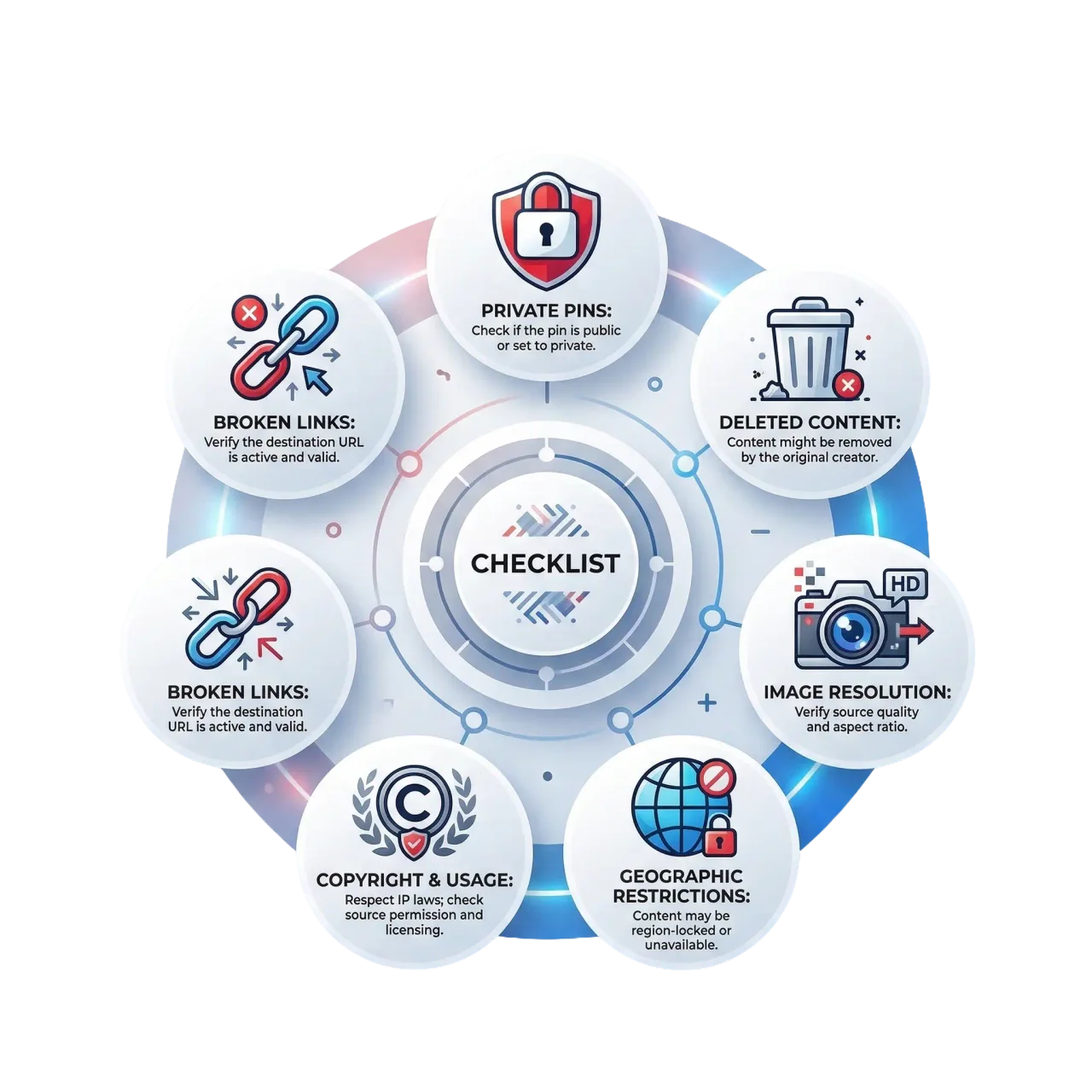
Things to Know Before Downloading Pinterest GIFs

Things to Know Before Downloading GIFs

Here are a few important points to keep in mind when using our Pinterest GIF downloader:

πŸ”’
Private Pins Are Not Accessible

If a GIF is on a private board or a secret pin, our tool cannot reach it. Only publicly available pins can be downloaded.

πŸ—‘οΈ
Deleted Pins Will Not Work

If the original creator deleted the pin or Pinterest removed it for policy violations, the download will fail. We cannot retrieve content that no longer exists on Pinterest's servers.

🎬
Some GIFs Are Actually Videos

Pinterest sometimes converts animated GIFs into MP4 video files for faster loading. If this happens, our tool will download the video version instead. The visual content remains the same.

©️
Respect Copyright

Just because you can download a GIF does not mean you can use it for commercial purposes. Always give credit to the original creator and check the usage rights before publishing.

🌍
Regional Restrictions May Apply

Some content on Pinterest is restricted in certain countries. If you cannot view the pin on Pinterest itself, you will not be able to download it here either.

πŸ”—
Check Your URL

Make sure you copied the complete Pinterest URL. Incomplete or incorrect links will cause errors. The URL should look like: pinterest.com/pin/[numbers]

Key Features That Make Us Different

🎞️
Full Animation Preserved

Unlike some tools that give you a static screenshot, we download the entire animated GIF with all frames intact. Every loop, every transition, every detail is preserved.

⚑
Lightning Fast

Most GIFs arrive almost at once. The work happens on our own servers, and a link you have already fetched comes straight from cache, so heavy traffic does not put you in a queue.

πŸ”’
HTTPS Encrypted

All connections between your device and our servers are encrypted. The links you paste and the files you download are transmitted securely.

🚫
Zero Watermarks

We never add our logo, branding, or any other watermark to your downloads. The GIF you save is the exact same file as the original.

πŸ“±
All Devices Supported

This tool works on iPhone, Android, iPad, Windows, Mac, and Chromebook. Any device with a modern web browser can use it. No app installation needed.

♾️
No Daily Limit

Save one GIF or a hundred in a day. There is no paywall and no upgrade prompt. We do throttle bursts above 20 requests per minute per address, which keeps Pinterest from cutting the service off.

πŸ”
Privacy Focused

We do not store your downloads, track your activity, or collect personal information. Your downloads go directly from Pinterest to your device.

πŸš€
No Signup Required

You do not need to create an account, verify your email, or provide any personal details. The tool is ready to use the moment you open this page.

What If the Download Does Not Work?

Here are the most common reasons why a GIF download might fail:

Link URL

The link was not copied properly (try copying it again)

Deleted

The GIF was deleted by the original creator

Private

The pin is set to private or restricted

Server Glitch

There is a temporary issue with Pinterest's servers

If the download fails, double-check the link and try pasting it again. In most cases, that solves the problem. If the issue continues, try again after a few minutes.

Frequently Asked Questions

Everything you need to know about downloading GIFs from Pinterest.

Can I download animated GIFs from Pinterest?β–Ύ

Yes. Our tool downloads the original animated GIF file exactly as it was uploaded to Pinterest. The animation stays intact and loops on any device. If Pinterest converted the GIF to a video format, we will download that video file instead.

Do I need a Pinterest account to download GIFs?β–Ύ

No. You just need the link to a public Pinterest pin. No account, no login, no signup required. Simply copy the pin URL and paste it in the box above.

Will the GIF animation be preserved after downloading?β–Ύ

Yes. The file you download is the original animated GIF with all frames and animation intact. It will loop and play just like it does on Pinterest. We do not convert it to a static image.

Why am I getting a video file instead of a GIF?β–Ύ

Pinterest sometimes converts uploaded GIFs to MP4 video format for better performance on their platform. When this happens, our tool downloads the video file because the original GIF is no longer available on Pinterest's servers. The visual content remains identical.

Is this tool really free?β–Ύ

Yes, completely free. No hidden charges, no subscription and no daily limit. The only guard is a throttle above 20 requests per minute per address, which exists so one client cannot take the service down for everybody else.

What devices does this work on?β–Ύ

It works on any device with a modern web browser. iPhone, Android, iPad, Windows laptops, Macs, Chromebooks, and tablets. There is no app to install. Just open this page in your browser and start downloading.

Can I download GIFs from private boards?β–Ύ

No. We can only access content from public Pinterest pins. If the board or pin is set to private or secret, our tool cannot reach it. This is by design, as we respect Pinterest's privacy settings.

Do you add watermarks to my downloads?β–Ύ

No, never. We do not add watermarks, logos, branding, or any modifications to your files. The GIF you download is the exact same file as the original on Pinterest.

How long does the download take?β–Ύ

The wait depends on the file size and your connection. A small reaction GIF lands almost immediately; a long multi-frame animation takes longer simply because more bytes have to travel.

Is it legal to download GIFs from Pinterest?β–Ύ

Downloading GIFs for personal use is generally fine. However, if you plan to use a GIF commercially or publish it publicly, you should check the original creator's copyright and usage terms. We encourage all users to respect copyright and give credit where it is due.

Do you track or store my downloads?β–Ύ

No. We do not store your downloaded files or track which GIFs you save. The file goes from Pinterest's servers straight to your device. There is no account and no analytics script on this site, so the only thing we ever hold is a short-lived request counter that stops one client from flooding the service.

The download failed. What should I do?β–Ύ

First, make sure the Pinterest URL is complete and correct. It should look like: pinterest.com/pin/[numbers]. If the link is correct, the pin might have been deleted or set to private. Try refreshing the Pinterest page to confirm the GIF still exists there.

Download Pinterest
GIFs Without Limits

Instant, private, watermark-free GIF downloads at ultra-high speed.
Your free toolkit for saving Pinterest animations.

Download GIF Now