

Pinterest Image Downloader

Free Pinterest image downloader tool. Save high-resolution images, infographics & photos in seconds. No app needed. Works on all devices. 100% free forever.

We are Working on Your URL!

Please wait while we fetch your Pinterest media. This usually takes just a few seconds.

⚠️ Please Do Not Close This Page ⚠️

By using this website you agree to our Terms of Service.

Try Our Extensions:

Save Pinterest Images and GIFs

Download original resolution images and animated GIFs from Pinterest without watermarks

HD Videos

Download Pinterest videos in the highest available quality

Fast & Free

Lightning-fast Speed for downloads with no registration required

Clean UI

Sleek, user-friendly interface designed for a smooth and fast experience

How to use Pinterest Photo Downloader?

Download your favorite Pinterest pins in a few steps.

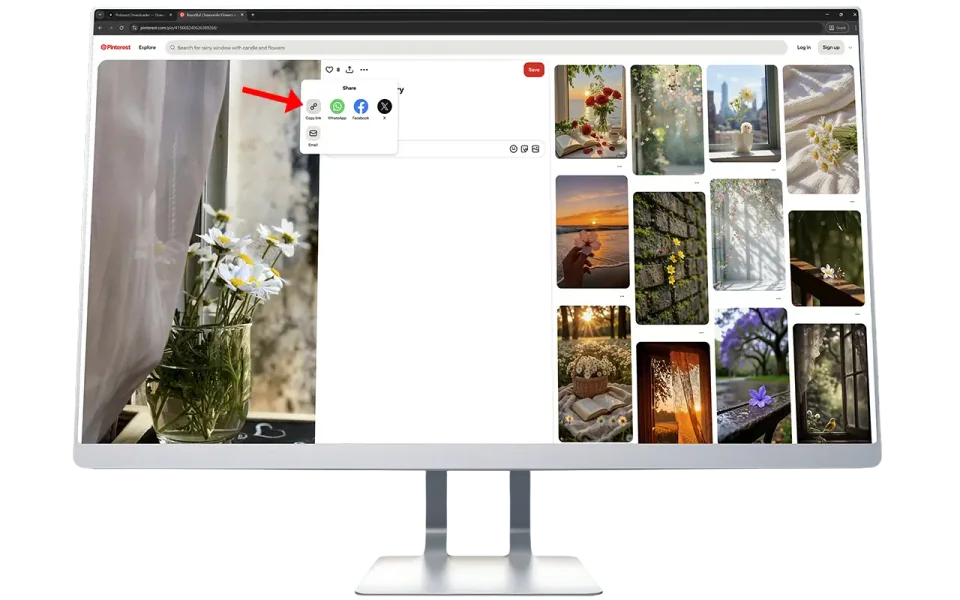
Copy the Pinterest Image Link

Open Pinterest in your browser or app. Find the image / photo you want to download. Click Share → Copy Link.

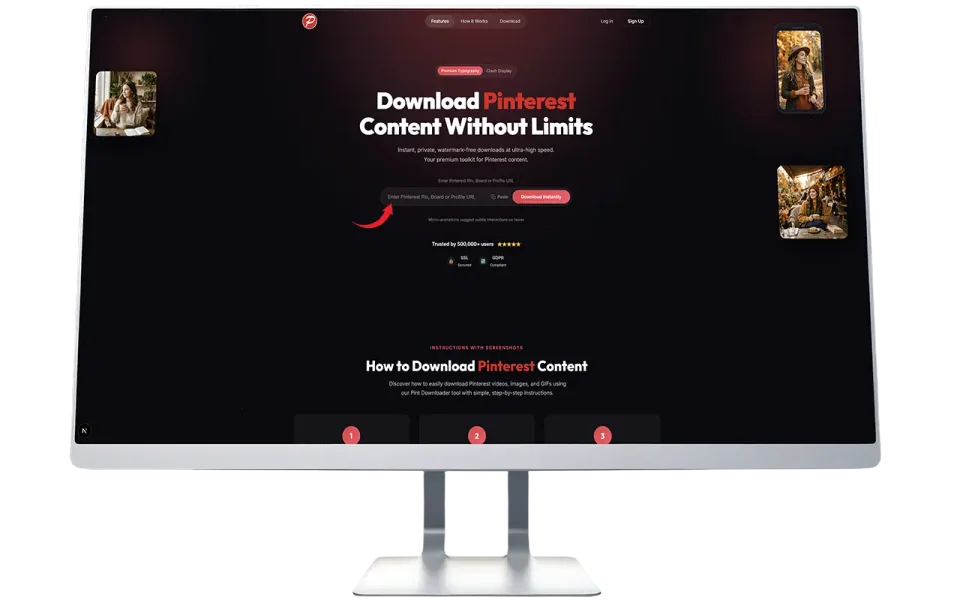
Paste the copied Link

Paste the copied link into the input box at the top, and click “Fetch Media” button to start the process.

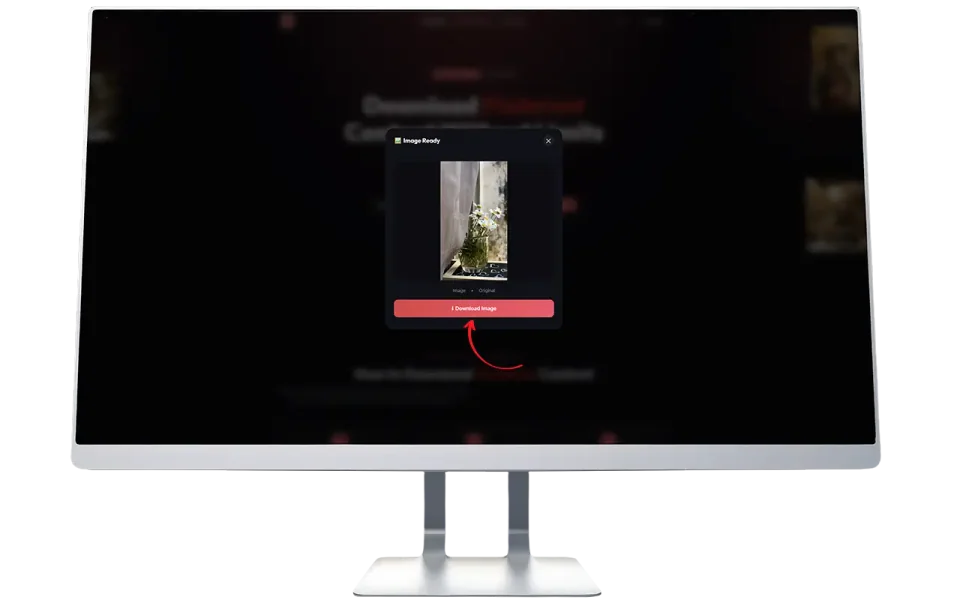
Save to Your Device

Wait a few seconds while we fetch the file from Pinterest’s servers. Click “Force Download” to store it on your device.

How to Download Pinterest Photos using PintDownloader?

Saving Pinterest photos is simple with PintDownloader. Just copy the image link from Pinterest, paste it in our tool above, and click download. The full-resolution image file saves to your device instantly. No signup needed, no watermarks added, and it works seamlessly on both mobile and desktop.

step-1-how-to-find-and-copy-an-pinterest-image-link

Click Share Icon and Copy Link

Open Pinterest app or website and copy the link of the image you want to download.

step-2-pasted-copied-link-in-search-input-box

Paste URL and Click “Fetch Media”

Paste the copied link in the search input box above and click on “Fetch Media” Button.

step-3-wait-for-the-process-and-download-image-photo

Download the Photo/Image

Wait for the process to complete, then select your desire quality you want download.

What is Pinterest Image Downloader?

It’s a simple web tool that lets you download any public Pinterest image/photo in its original quality, the exact file the creator uploaded, not a compressed version.

Whether it’s a quote graphic, a food photography shot, an architectural rendering, or a vintage poster, you get the actual high-resolution file. No quality loss. No cropping. No weird formatting issues.

Why You Actually Need This Tool

Over the years, I’ve talked to hundreds of people who use Pinterest daily — bloggers, small business owners, event planners, students, DIY enthusiasts. Here’s what they told me:

Why You Actually Need This Tool

✅ Designers and Creatives:

They collect reference images for client projects. Color palettes, typography examples, layout ideas — they need these files locally to show clients or use in mood boards. Pinterest’s interface doesn’t make this easy.

✅ Content Creators and Bloggers:

They find visual inspiration for their posts. A recipe blogger might want to reference plating styles. A travel writer needs destination photo ideas. Having these images saved offline helps when they’re writing or editing.

✅ Teachers and Students:

I’ve worked with educators who build visual presentations. They find historical images, scientific diagrams, or art references on Pinterest and need clean, high-quality versions for classroom use.

✅ Event Planners:

Wedding planners, party organizers, interior designers — they collect hundreds of inspiration images. Downloading pinterest videos always makes it easier to share with clients via email or create physical inspiration boards.

✅ Small Business Owners:

Social media managers often find design ideas on Pinterest. They want to analyze what works — color schemes, layouts, text placement and having the actual files helps them study the details.

In my experience, most people aren’t trying to steal content. They are trying building personal collections, learning from what works, or using images as temporary placeholders while they create original work.

How Our Pinterest Image Downloader Works

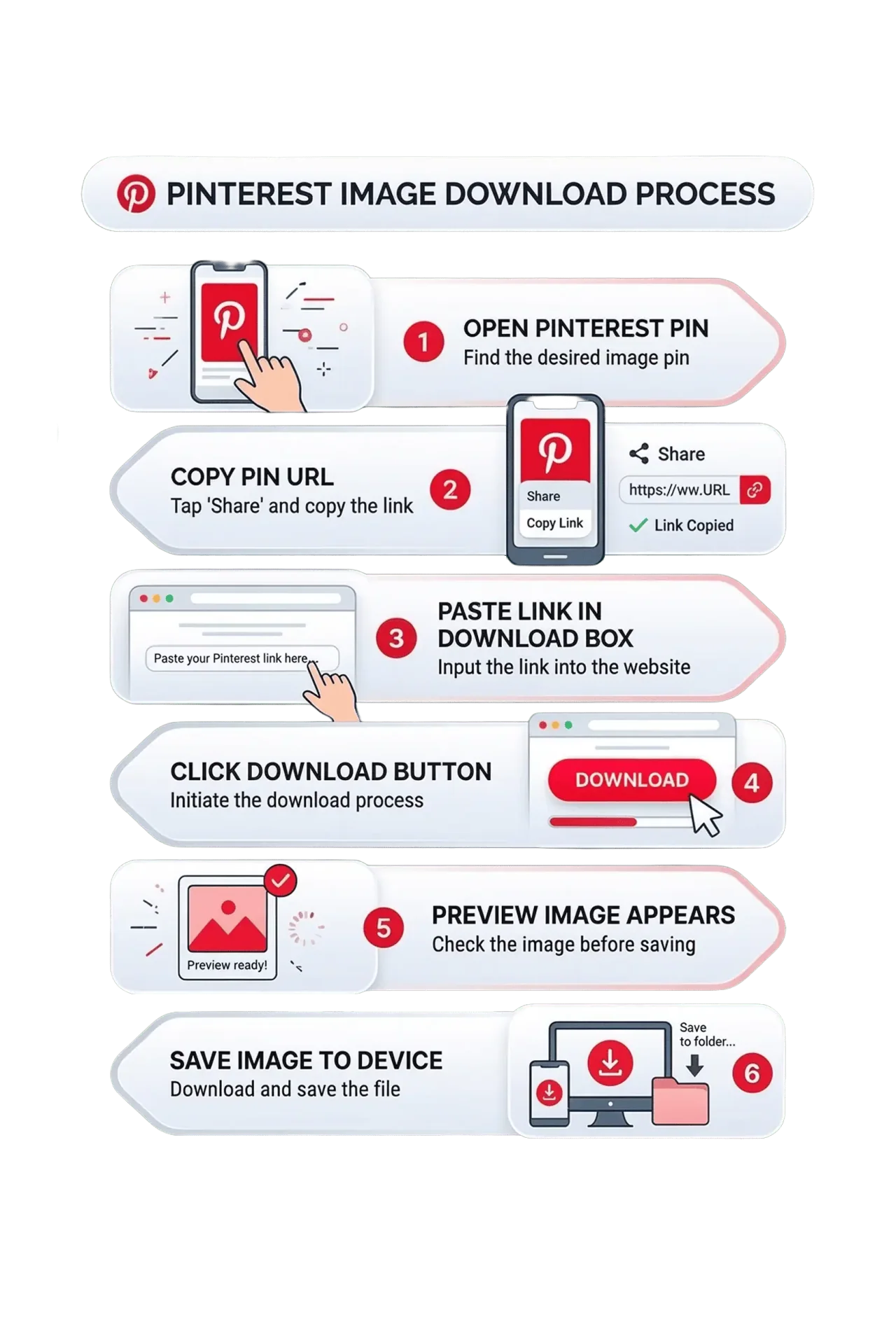
I tested PintDownloader tool myself on multiple devices before we launched it. Here’s the exact process:

  1. Open the Pinterest website and choose the image you want to download.
  2. Open any image pin then copy the url from browsers bar like this (https://www.pinterest.com/pin/885661082981717612/)
  3. Paste the copied link into the download box.
  4. Click or tap the “Media Fetch” button.
  5. A preview of your file will appear.
  6. Click the Force Download button to save it to your device.
How Our Pinterest Image Downloader Works

Mobile Users: Step-by-Step Guide

Since most of you are on phones, here’s the mobile-specific process:

For iPhone Users:

  1. Open Pinterest app or mobile browser
  2. Find your image and tap the three dots and Tap on “Share
  3. Select “Copy Link
  4. Open Safari or Chrome and go to PintDownloader.com
  5. Tap in the download box and select “Paste”
  6. Tap “Fetch Media
  7. The image saves to your Photos app

For Android Users:

  1. Open Pinterest (app or browser)
  2. Tap the three dots on the pin and then tap on “Share
  3. Choose “Copy Link
  4. Open Chrome and visit PintDownloader.com
  5. Long-press the download box and tap “Paste
  6. Tap “Fetch Media
  7. Find it in your Downloads folder or Gallery

I tested this on both platforms multiple times. It works smoothly.

Why use Pint Downloader?

Ever scrolled through Pinterest and found the perfect infographic, recipe card, or design inspiration – only to realize there’s no easy way to save it in high quality? I’ve been there too many times to count.

Why use Pint Downloader Tool

After working with content creators and designers for over 11 years, I’ve seen how frustrating it can be when you need that one perfect image for a project, presentation, or mood board, but Pinterest only gives you a compressed preview or makes you jump through hoops to get the original file.

That’s exactly why we built this Pinterest Image Downloader:

  • No app downloads
  • No signup hassles
  • No watermarks.

Just paste the link and get your image in full resolution.

Key Features That Actually Matter

✅ Full HD and Original Resolution
We don’t compress or resize anything. You get exactly what the creator uploaded. If they posted a 4K image, you download a 4K image.

✅ Lightweight Code
The tool loads fast because we keep the code minimal. No heavy frameworks, no unnecessary scripts.

✅ HTTPS Encryption
All connections are encrypted. The links you paste and the files you download are transmitted securely.

✅ No Watermarks Added
Some tools slap their logo on your downloads. We don’t. The file you save is clean — just like the original.

✅ Works on All Devices
I’ve tested this on iPhone, Android, Windows laptops, and Macs. It works the same everywhere. Mobile users don’t need a separate app.

✅ No File Size Limits
Whether it’s a small icon or a massive architectural rendering, the tool handles it. I’ve downloaded 15MB+ images without issues.

✅ Supports All Image Formats
JPG, PNG, WebP, GIF — whatever format the original was uploaded in, that’s what you get.

✅ Lightning Fast Processing
Most downloads are ready in 2-3 seconds. We use optimized servers and a CDN to make sure the tool doesn’t lag, even during peak hours.

What Makes Us Different From Competitors?

I have tested pretty much every Pinterest downloader out there. Here’s what I noticed:

pintdownloader-exclusive-features

✅ We Don’t Store Your Downloads
The image goes directly from Pinterest’s servers to your device. We don’t keep copies on our servers. Your downloads are private.

✅ No Tracking
We don’t log what you download or track your activity. We use basic analytics to see how many people use the tool (for server capacity planning), but nothing personally identifiable.

✅ Most tools are slow
They process downloads on overloaded servers. You wait 10-15 seconds per image. Ours averages 2-5 seconds because we use distributed servers and caching.

✅ Many add watermarks
They slap their branding on your downloads. We don’t touch your files. What you see on Pinterest is what you download.

✅ Some require signup
They make you create an account or verify your email just to download one image. We never ask for personal information.

✅ Others are mobile-hostile
Their interfaces don’t work well on phones. Since 70% of Pinterest users are on mobile, we designed our tool mobile-first.

✅ Several have daily limits
They cap you at 3-15 downloads per day unless you pay. We don’t have limits. Download as many as you need.

✅ A few are sketchy
Pop-up ads everywhere. Redirect loops. Suspicious permissions. We keep it clean and straightforward.

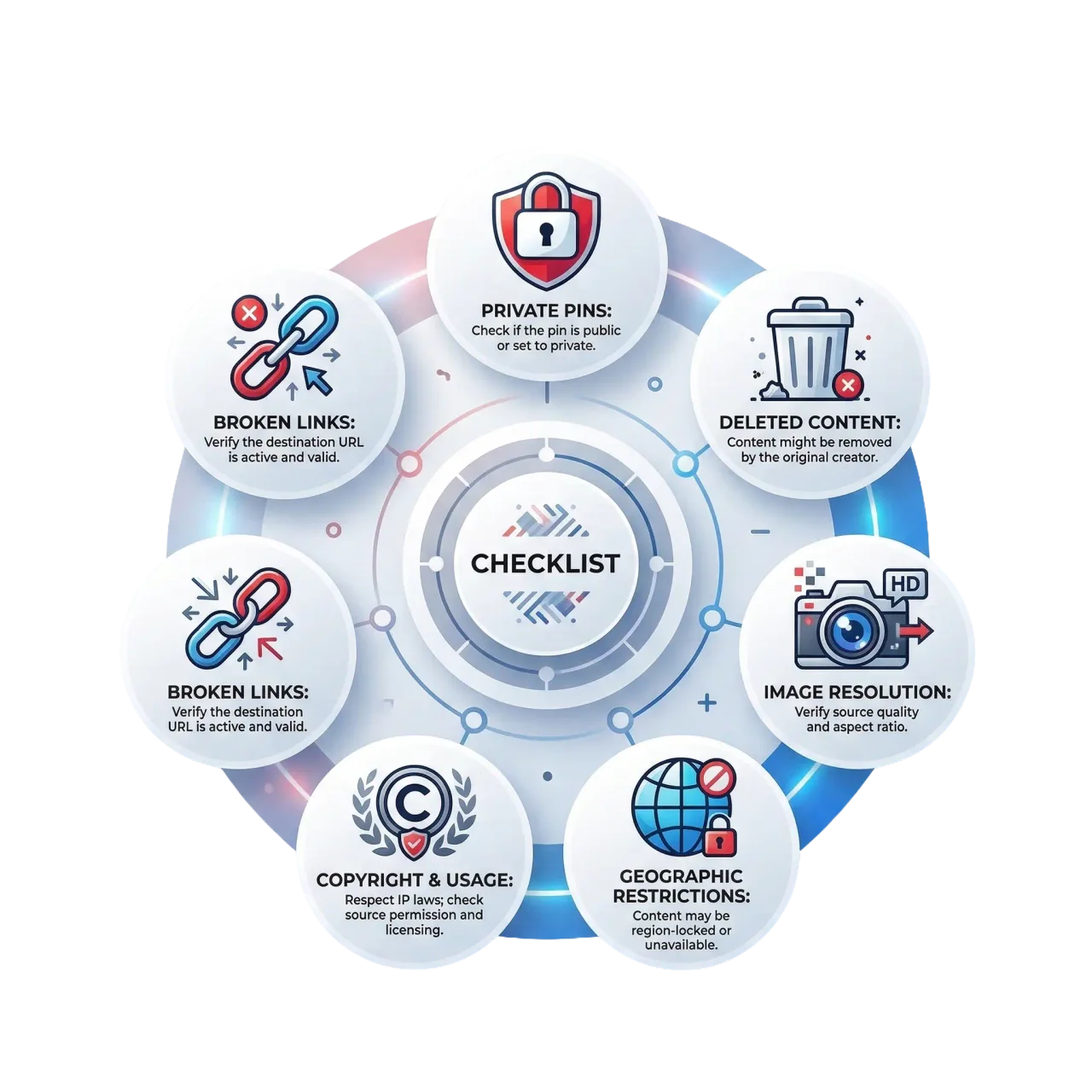
What to Know Before Downloading Pins

Every online tool works within platform rules. Here’s what you should know when using our Pinterest downloader:

Private Pins Don’t Work

If someone has a private board that you don’t have access to, we can’t download those images. Pinterest’s privacy settings apply here too.

Deleted Content Returns Errors

If a pin was deleted by the creator or removed for policy violations, the download will fail. We can’t retrieve content that Pinterest has removed from its servers.

Original Quality Matters

If the original uploader posted a low-resolution image, that’s what you’ll get. We can’t magically add detail that wasn’t there to begin with.

Geographic Restrictions

In some regions, Pinterest blocks certain content. If you can’t see it on Pinterest, you can’t download it here either.

Copyright Still Applies

This is important. Just because you can download an image doesn’t mean you can use it commercially. More on this below.

Spelling Mistakes / Wrong URL

Sometimes users enter wrong pin url or make mistake in typing the url of the pin. In that way error may occurs, so check url before trying.

Frequently Asked Questions

Look, I know how it is with free online tools. You’re probably wondering: “What’s the catch? Is this actually safe? Will it work on my device?”

Below are the most common questions users ask about our Pinterest image downloader, answered honestly based on real experience.

No. You don’t need to be logged into Pinterest or even have a Pinterest account. As long as the pin is public and you have the link, you can download it.

No. This is a web-based tool that works directly in your browser. Whether you’re on iPhone, Android, Windows, or Mac — just open the website, paste the Pinterest link, and download. I specifically designed it this way because app installations are a hassle, take up storage space, and often require permissions you don’t want to give.

Usually 2-3 seconds. The speed depends on your internet connection and the image file size. Large high-resolution images (5MB+) might take a few seconds longer, but the process is generally very fast.

Make sure you copied the full Pinterest URL, not just part of it. It should look like: pinterest.com/pin/[numbers]

The pin might have been deleted, or it could be a private pin. Try refreshing Pinterest and checking if the image still loads there.

That’s Pinterest’s internal naming system. You can rename the file after downloading.

Yes, completely free. No hidden charges, no subscription plans, no premium tiers. I’ve been running tools like this for years, and I believe basic functionality should always be free. You can download as many Pinterest images as you need without paying a cent. We might add optional premium features later (like bulk downloads), but the core tool will always remain free.

Whatever format the original was uploaded in — JPG, PNG, WebP, or GIF. We don’t convert or change formats. If you need a different format, you can use our Image Format Converter tool after downloading.

The creator might have uploaded a low-res version. Try finding a similar pin from a different source — sometimes the same image exists in better quality from another user.

Some images on Pinterest are stored as WebP (a modern format). Most devices support it, but if you need JPG, use our Image Format Converter tool (coming soon).

You get the highest resolution available from Pinterest’s servers. If the creator uploaded a 4K image, you’ll download 4K. If they uploaded 1080p, that’s what you get. We don’t compress or reduce quality. However, if someone originally uploaded a low-resolution image to Pinterest, we can’t magically improve it — you’ll get that same low-res version.

No. We don’t store your downloads or track which images you save. The download happens directly between Pinterest’s servers and your device — our tool just facilitates the connection. We use basic analytics to see how many people use the tool (for server capacity planning), but nothing personally identifiable. Your privacy is important, and we don’t need or want your data.