Pinterest Profile
Picture Downloader

View and download any Pinterest user profile picture in full HD resolution. Fast, secure, and completely anonymous.

Free to use. No account, no ads, no daily cap.
🖼️
Original Resolution

We fetch the original file that was uploaded rather than the small square the app displays, so the image stays sharp at full size.

🕵️
Fully Anonymous

Your privacy is safe. We do not track your downloads, and the profile owner is never notified.

Instant Preview

Profile details are fetched once and held briefly, so looking up the same account twice is instant.

💻
Cross Platform

Works perfectly on Windows, Mac, Android, and iOS devices directly within your favorite browser.

How to Save a Profile Picture?

Downloading a display picture is straightforward. Just follow these simple visual steps.

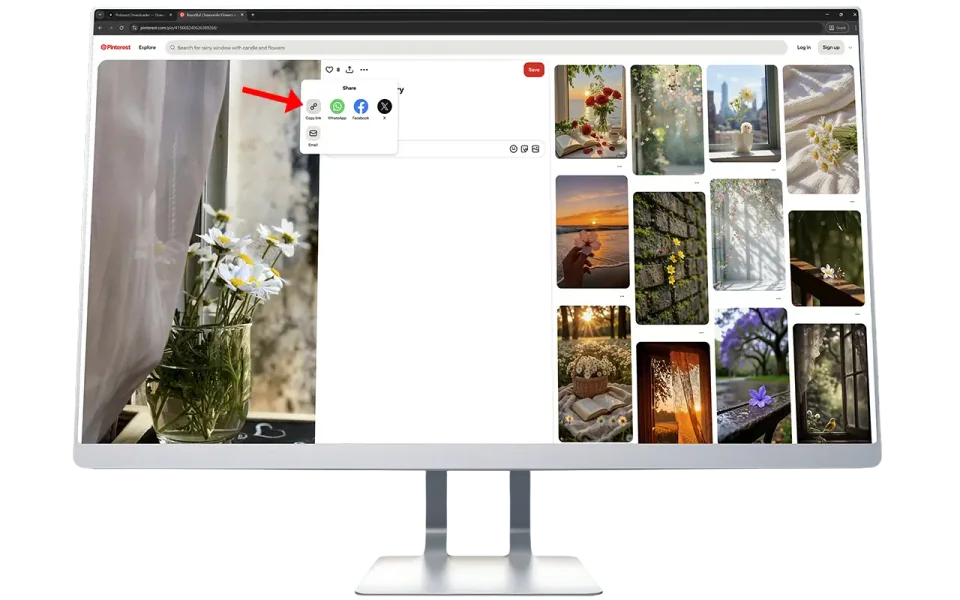
1
copy-pinterest-profile-url

Get the Profile Link

Open the Pinterest application or website. Go to the desired user profile and copy their page link.

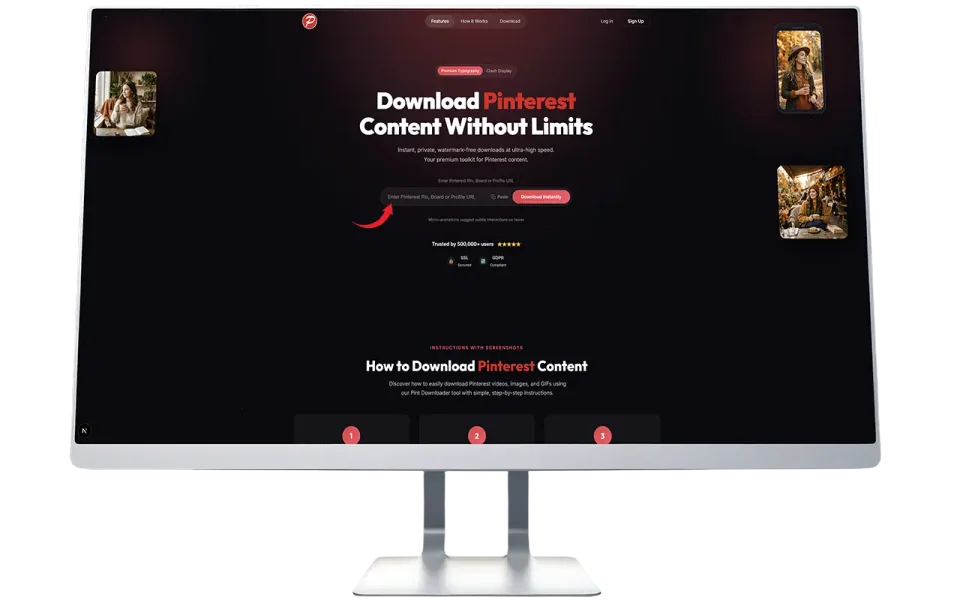
2
paste-the-link

Paste the URL

Come back to our website. Paste that copied link right into the search input box and click Fetch Media.

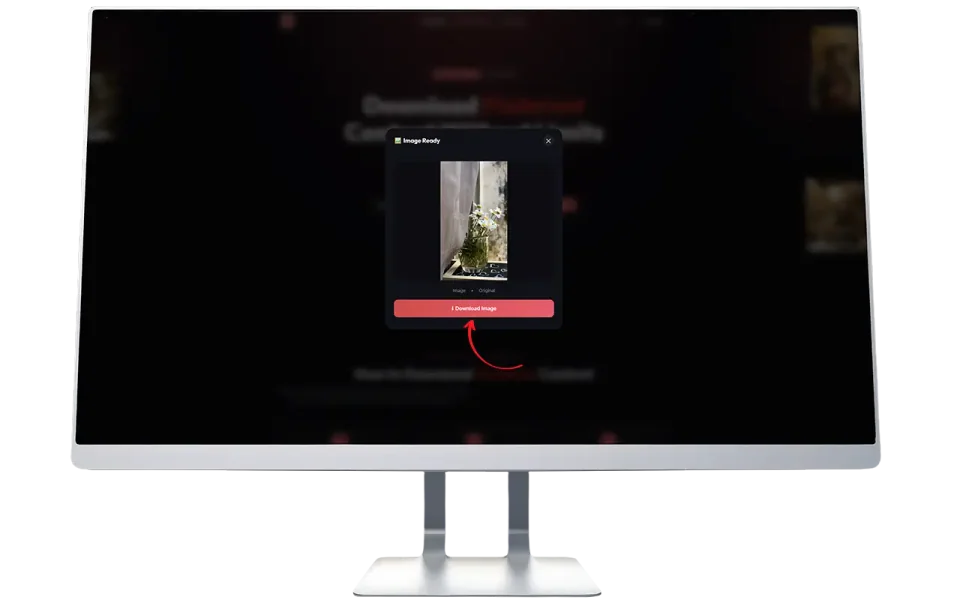
3
download-hd-profile-picture

Download the Image

Our system will display the profile preview. Simply click the download button to save the HD file to your gallery.

What is the Pinterest PFP Downloader?

A Profile Picture (often called a PFP or Avatar) is a key part of any social media identity. Sometimes you come across a beautiful, artistic, or inspiring profile picture on Pinterest that you want to look at more closely. However, the official Pinterest app only displays a small circular version of this image and offers no way to zoom in or save it.

Our dedicated PFP Downloader solves this exact problem. It is a specialized tool that communicates directly with Pinterest servers to locate the highest quality original image file. When you enter a profile link, we extract that hidden high resolution image and present it to you in a premium preview window.

This tool is highly popular among digital artists, designers, and regular users who want to appreciate the intricate details of small profile icons. Best of all, it requires absolutely no account registration and is entirely free for everyone around the world.


Why Download a Profile Picture?

There are many excellent reasons why users need to save full size avatars.

🎨
Design Inspiration

Many Pinterest accounts feature stunning digital art or graphic design logos as their display picture. Designers save these for creative inspiration.

🔍
Viewing Details

On a mobile phone screen, it is nearly impossible to see the fine details of a small round avatar. Downloading it allows you to zoom in and see everything clearly.

🤝
Identity Verification

Sometimes you need to verify if the person following you is an actual friend or a brand you know. A large clear photo makes this identification much easier.

💾
Account Backups

If you lost the original file of your own profile picture, you can use our tool to recover and download your own high quality avatar back to your device.

Having Trouble?

If you face any issues while fetching a profile, please check these common situations:

Link Error

Make sure you copy the exact link of a user profile, not a specific pin or board.

Deleted

The account may have been deleted or temporarily suspended by Pinterest.

Private

The user might have extremely strict privacy settings applied to their account.

Server Glitch

Your internet connection might be unstable. Refresh the page and try again.

Frequently Asked Questions

Find answers to the most common questions about our service.

How do I get the link of a profile?

Go to the person's profile page on Pinterest. If you are on a computer, simply copy the URL from the top address bar. If you are on the mobile app, tap the three dots icon at the top right corner and select Copy Link.

Is it legal to download a profile picture?

Yes, downloading public display pictures for personal viewing is perfectly fine. However, you should not use someone else's face or logo for your own commercial business without their permission.

Does this tool work on iPhone and Android?

Yes. Our platform is completely web based. You can use it on any smartphone by opening Safari, Chrome, or any other modern web browser.

Why is the downloaded image sometimes a bit blurry?

We always extract the absolute largest file that Pinterest stores on their servers. If the user originally uploaded a low quality image years ago, Pinterest will only have that small version available.

Do you keep a record of the profiles I search?

No. We deeply respect user privacy. We do not store your search history, and we do not log the profile links you process through our system.

Ready to Save a Profile Picture?

Paste the link above and get the full resolution image instantly.
No watermarks, no registration, totally free.

Try It Now