Pinterest Profile
Downloader

Paste a Pinterest profile or board link and see its pins as a grid you can pick from. Download as many as you want, one file at a time, without signing in.

How to download a Pinterest profile

The whole flow is: open the profile, copy the address bar, paste it above. The grid appears and you pick what you want.

1
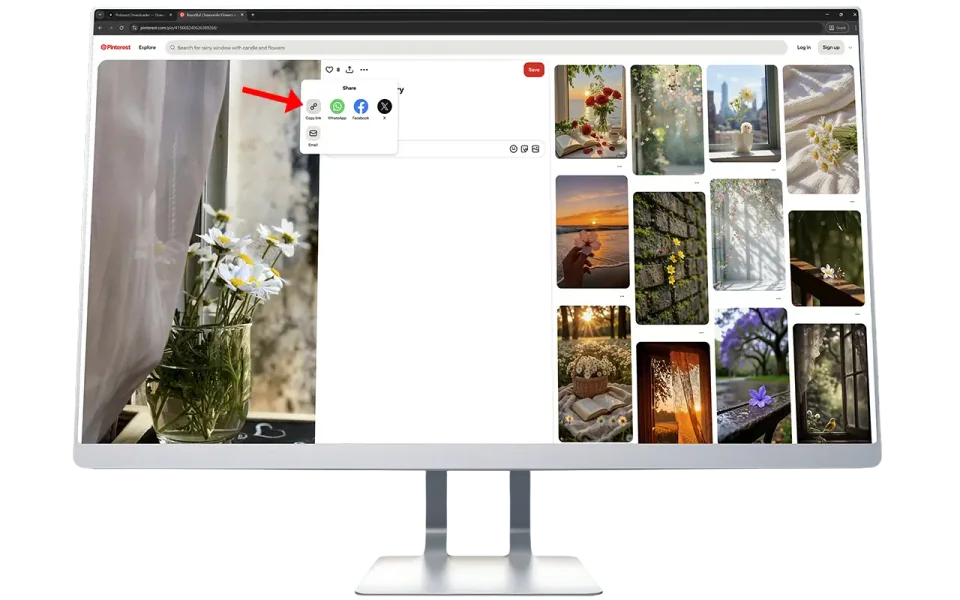
copy the pinterest profile url

Copy the profile link

Open the profile on Pinterest and copy the address. On a phone, use Share and then Copy Link.

2

paste the profile url

Paste it above

Paste into the box and press Load Profile. The profile header and its pins load together.

3
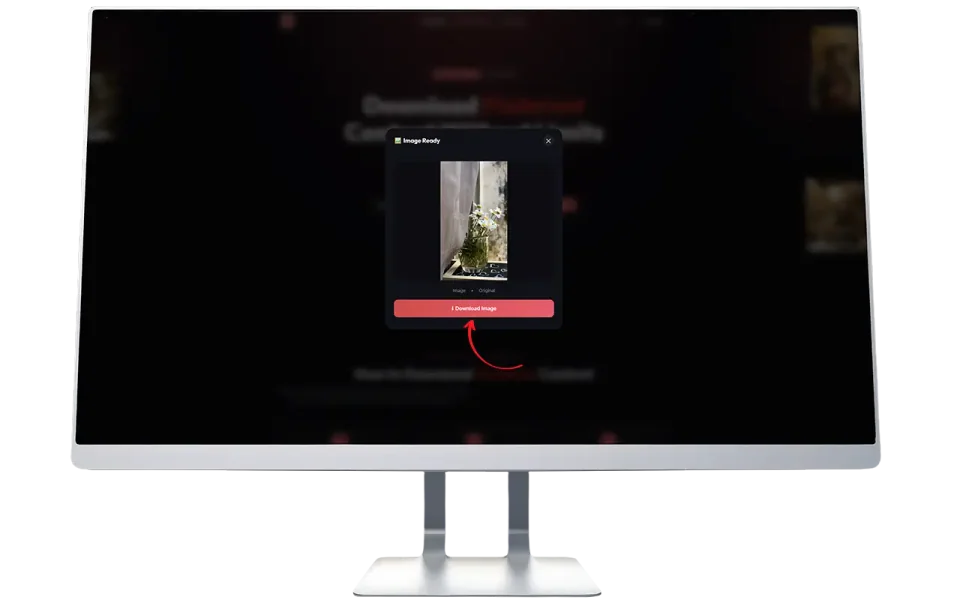
select and download the pins

Pick and download

Tap the pins you want, press Select all if you want the lot, then Download selected.

What this profile downloader actually does

🧱
Reads the whole pin grid, not one pin

Pasting a profile link into a pin downloader returns one image, because those tools ask for a single pin. This page reads the profile as a list and shows you the grid.

✅
Select, then download

Nothing downloads until you press the button. Pick five pins or pick everything, then let the queue run.

đŸŽŦ
Videos and carousels included

A video pin saves its video file, and a story or carousel pin saves every slide it holds, not only the cover.

đŸ—‚ī¸
Boards work the same way

Paste a board link and the grid shows that board's pins instead of the whole profile, which is the way to go deep on a large account.

⚡
One read, a hundred pins

The grid arrives a hundred pins at a time rather than one call per pin, and a profile read in the last half hour is served from cache.

đŸ–ŧī¸
Grid loads light, saves full

The tiles are a smaller version of each image so a long grid stays quick. The file you download is the original.

Where this tool stops

Knowing these four things in advance saves a lot of clicking.

đŸ”ĸ
Five hundred pins per visit

Each press of Load more adds another hundred. Past five hundred, open the board you are interested in and start again from that board's URL.

🔒
Private accounts are out of reach

Only what a logged-out visitor can see is readable. Private profiles and secret boards are not.

âŗ
Big downloads take time

Files save one after another, so two hundred photos is a wait rather than a single zip. Keep the tab open, the queue stops if you close it.

ÂŠī¸
Saving a file is not a licence

Downloading someone's image does not give you the right to publish it. Treat what you save as a reference unless the owner has said otherwise.

Other tools on this site

Profile downloader FAQ

Can I download every image from a Pinterest profile?▾

You can download every pin the profile exposes publicly, and the grid reads them a hundred at a time up to five hundred per visit. A very large account, one with a million pins for example, is not fully reachable in one go: that is a limit of what Pinterest serves to a logged-out reader, not of this tool. For an account that big, open the board you want and use that board's URL instead.

Do I need a Pinterest account?▾

No. The profile is read exactly as a logged-out visitor sees it, so only public profiles and public boards come back.

Why do some tiles say Video or Multi?▾

A tile marked Video holds a video file, and one marked Multi is a story or carousel pin holding several images. Both need one extra read on the pin page before the file can be saved, so they take a moment longer than a plain image. The download itself works the same way.

Why does a private profile not work?▾

A private profile's pins are only visible to approved followers. Pinterest does not serve them to a logged-out reader, and this tool does not log in on your behalf, so those pins cannot be read.

How many profiles can I open per minute?▾

Six profile reads per minute per visitor, and each read is one page of up to a hundred pins. The limit exists because a single profile page is a large download for the server. A profile that someone already opened in the last half hour is served from cache and costs nothing.

Are the images full quality?▾

Yes. You get the original file Pinterest stores, the same one the profile shows. Nothing is resized, recompressed or watermarked.

What happens to the files, where are they stored?▾

Nothing is stored by us. The grid reads pin details from Pinterest, and the file then travels from Pinterest's servers to your device. There is no account and no library on our side.

The download stopped part way through▾

Two things cause this. Closing the tab stops the queue, and a browser that is asked to save a lot of files at once will sometimes skip one. Failed pins stay selected and listed at the top of the grid, so press Download again to retry just those.

Is this the same as the profile picture downloader?▾

No, and the two are separate tools. The profile picture downloader saves the round avatar image. This page reads the profile's pins, which is everything the account has posted.