Pinterest Reels
Downloader

Free tool to download Pinterest Reels and Idea Pins in HD 1080p. Save short video clips with sound directly to your phone.

Free to use. No account, no ads, no daily cap.
🔒
HTTPS
Encrypted
✅
No trackers
No ad scripts

Try Our Extensions:

đŸŽŦ
Save HD Reels

Download short videos and Idea Pins in full 1080p resolution. Enjoy crisp video quality on any screen size.

đŸŽĩ
Keep The Audio

We make sure the downloaded video includes the original background music, voiceover, and sound effects.

⚡
Fast Downloads

Your video is prepared on our own servers and handed over as a direct link, so the file starts moving as soon as you pick a quality.

📱
Mobile Friendly

The design works perfectly on all smartphones. Saving videos straight to your mobile gallery is simple.

How to Download Pinterest Reels?

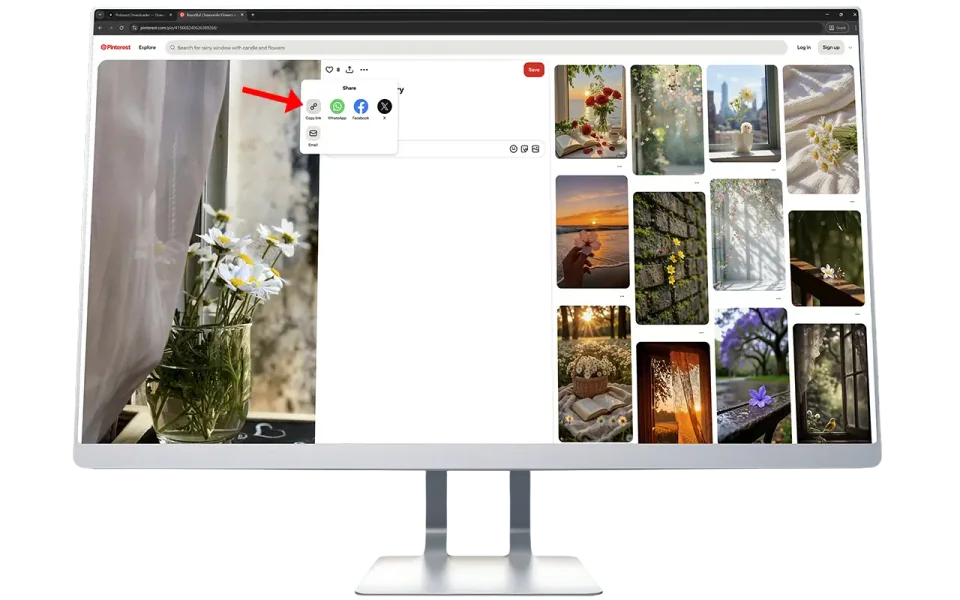
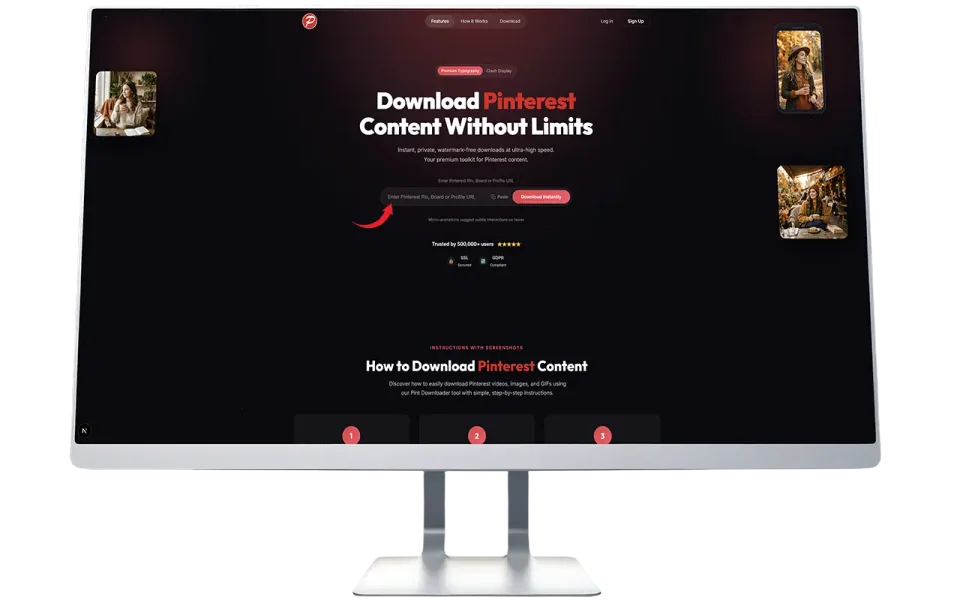
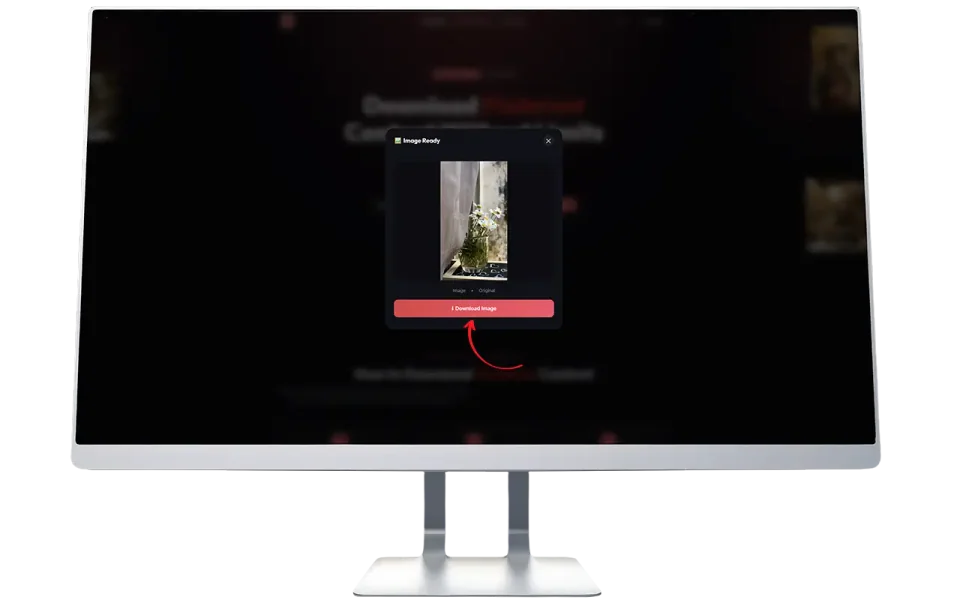
Saving short videos from Pinterest is very easy. Copy the Reel link, paste it in the box above, and click download. The video file will save to your phone instantly.

1
copy-pinterest-reel-url

Copy the Video Link

Open the Pinterest app and find a Reel. Tap the share icon and select the option to copy the link.

2
paste-the-copied-link

Paste the Link

Return to our website. Paste the link into the search box and click the Fetch Media button.

3
download-your-video

Download the File

Review the preview to make sure it is the correct video. Finally, click the Download Video button.

What is Pinterest Reels Downloader?

Pinterest introduced Idea Pins, commonly known as Reels, to allow creators to share short video stories. These videos are highly engaging and full of useful tips, recipes, and DIY projects. However, the official app does not provide a direct way to save these videos to your phone storage.

This dedicated tool solves that problem. It is designed specifically to extract MP4 video files from Pinterest Idea Pins. When you find a helpful video, you just copy its link and paste it here. Our system processes the link and provides a direct download button for the HD video file.

We built this platform to be accessible for everyone. There is no software to install, no annoying popups, and no account required. It works directly in your web browser, whether you use an iPhone, an Android phone, or a desktop computer.


Why People Save Pinterest Videos

Short videos are packed with valuable information. Here are the main reasons why our users download Reels from Pinterest:

đŸŗ
Saving Recipes

Many creators post quick recipe videos. Watching a recipe offline while cooking in the kitchen is much easier than constantly reloading a webpage or worrying about internet connection drops.

đŸ› ī¸
DIY and Craft Tutorials

Idea Pins work well as step by step craft tutorials. Crafters often save these videos to follow along at their own pace. They can pause, rewind, and rewatch the details without lag.

đŸ’Ē
Workout Routines

Fitness instructors share excellent workout snippets on Pinterest. Users download these clips to play them at the gym where the internet signal might be weak.

đŸ’Ŧ
Sharing with Friends

Sometimes you find a video so good that you want to share it directly in a chat group. Sending the actual video file is often better than sending a link that requires an app to open.

📁
Creating Mood Boards

Designers and planners collect video clips alongside images for their digital mood boards. Having the raw video files gives them the flexibility to organize content locally on their computers.

We always remind our users to respect the hard work of content creators. Please use downloaded videos for personal reference and avoid uploading them elsewhere without permission.

How Our Video Downloader Works

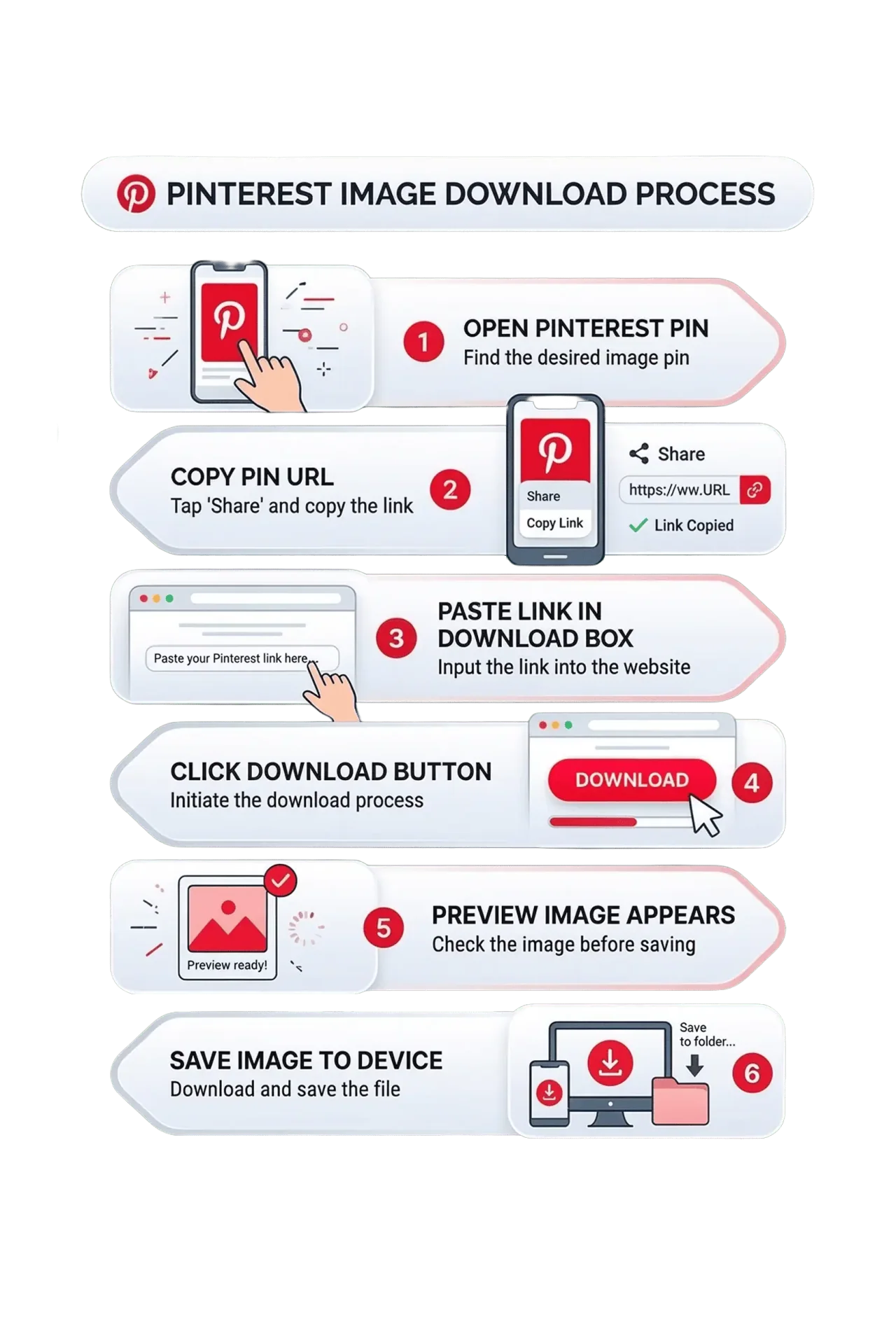
We designed the process to be straightforward. Here is exactly what happens when you use our website:

1

You find an interesting Reel or Idea Pin on the Pinterest platform.

2

You copy the specific web link for that video pin.

3

You paste the link into our secure download tool on this page.

4

You click the "Fetch Media" button. Our system then communicates with the Pinterest servers.

5

We locate the highest quality MP4 file available for that specific pin.

6

You click Download Video to save the file locally to your own device.

How Our Pinterest Video Downloader Works

Mobile Guide: Save to Your Phone

A large portion of our visitors use mobile phones. Here is how to save videos correctly on your device:

🍎 For iPhone (iOS):

1

Open the Pinterest app and watch a Reel video

2

Tap the share icon located on the right side

3

Select "Copy Link" from the menu

4

Open the Safari browser and visit our website

5

Paste the link and tap Fetch Media

6

Tap Download Video

7

The video will appear in your Safari Downloads folder

8

You can then save it to your Photos app if you prefer

🤖 For Android:

1

Open your Pinterest app and find a video pin

2

Tap the share icon on the screen

3

Tap "Copy Link"

4

Open Google Chrome and navigate to our page

5

Paste the copied URL in the white search box

6

Tap the Fetch Media button

7

Tap the Download Video button

8

The MP4 file saves straight to your Gallery

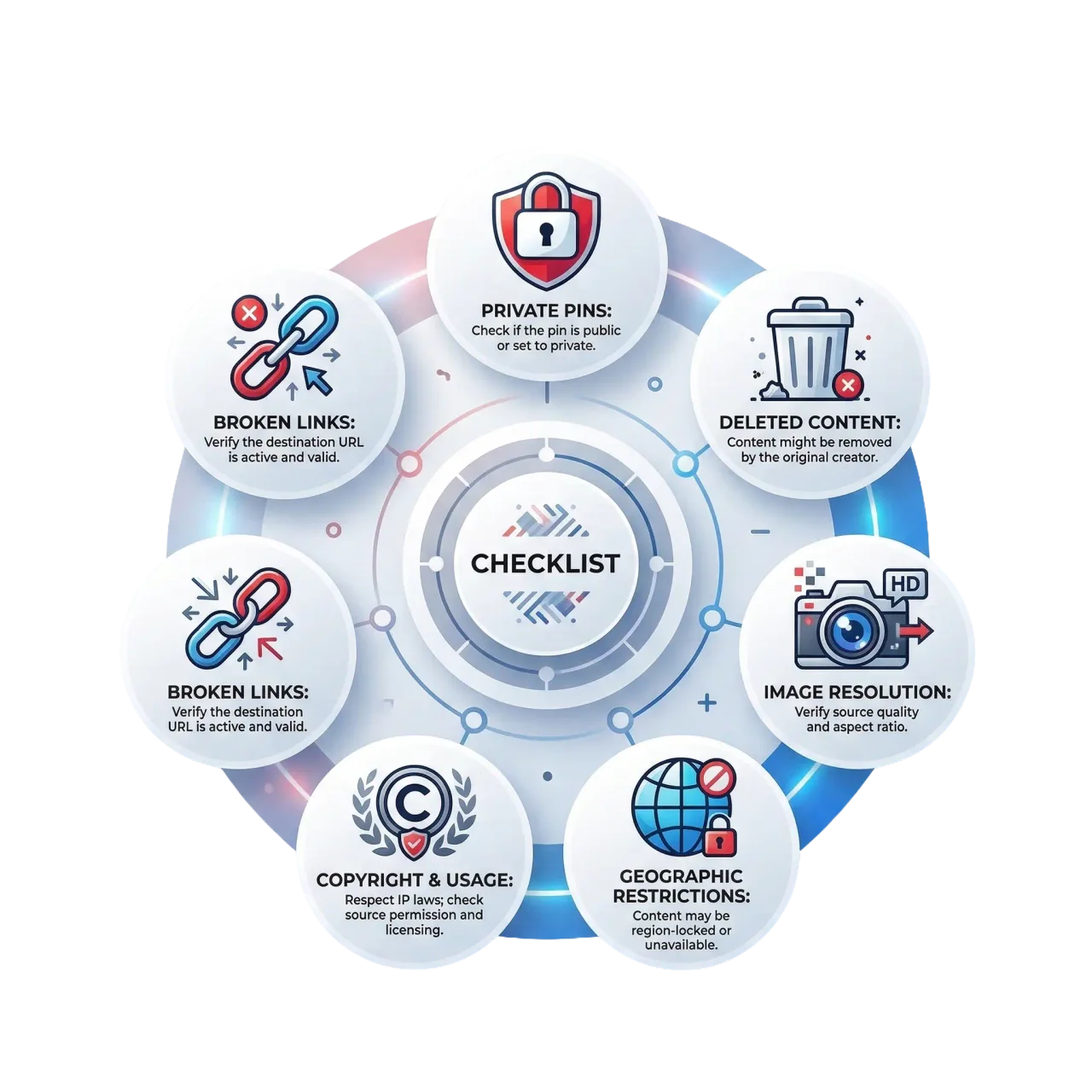
Things to Know Before Downloading Pinterest Reels

Important Things To Note

Before you begin downloading videos, there are a few important points regarding our service and its capabilities:

🔒
Public Videos Only

We can only process links from public accounts. Videos saved on secret boards are blocked for privacy reasons.

đŸ–ŧī¸
Image vs Video Links

Ensure the link you copy is actually a video or an Idea Pin. If it is a static photo, you will receive an image file instead.

ÂŠī¸
Ownership Matters

The videos you save belong to their respective creators. Do not use downloaded content for commercial advertising without explicit consent.

🌍
Regional Availability

Sometimes videos are restricted to specific countries. If a video is blocked in your region, the download process might fail.

Features That Stand Out

đŸŽĨ
True HD Resolution

We do not compress the video files. You get the genuine 1080p high definition quality as uploaded by the creator.

đŸŽĩ
Audio Included

Your video downloads will play perfectly with full audio and background music intact.

🔒
Secure Platform

The site is served over HTTPS using current TLS, and that is the only transport available. There is no plain HTTP endpoint to fall back to and no mixed content on any page.

đŸšĢ
No Hidden Fees

You will never hit a paywall here. Every feature on this platform is completely free for everyone to use.

Having Trouble with Your Download?

If you encounter an issue, it is usually easy to fix. Look at these common problems:

Link Error

The URL is incomplete. Please copy the link properly from the app.

Deleted

The video was deleted by the user or removed by the platform.

Private

The Idea Pin is located inside a private or restricted board.

Server Glitch

There is a network glitch. Please wait a few seconds and try again.

Frequently Asked Questions

Common questions about downloading Reels and Idea Pins.

What is a Pinterest Reel?▾

A Pinterest Reel is a short, engaging video format similar to what you see on TikTok or Instagram. On Pinterest, these are officially known as Idea Pins. They suit quick tutorials and before-and-after clips.

Do I need to install any special software?▾

No, you do not need to install anything. Our service works entirely within your web browser. This keeps your device clean and saves storage space.

Will the video have a watermark on it?▾

Absolutely not. We provide a clean video file. We do not insert any branding, logos, or watermarks over your downloaded videos.

Is the audio included in the download?▾

Yes. The MP4 file you receive will have the full audio track, including voiceovers and background music, exactly as it sounds on the original pin.

Is this service really free?▾

Yes. We do not charge for any downloads. You can save as many videos as you like without spending any money.

Can I download videos on my iPhone?▾

Yes, our website is fully compatible with iPhones. You can use the Safari browser to copy and paste links. The videos will be saved in your downloads folder.

Why did my download fail?▾

Downloads usually fail if the video is private, if the link is broken, or if the creator deleted the pin. Double check your link and ensure the video is public.

Do you keep copies of the videos I download?▾

No. The file passes through our server on its way to you as a stream, and nothing is written to disk. We keep no copy of any download.

Save Pinterest Reels
With Audio Today

High quality MP4 downloads that are fast, private, and free.
Keep the videos you save on your own device.

Download Video Now